Descriptive Flexfields
Please refer to the Descriptive Flexfields documentation for more information about them and their limitations.
Bulk Data Load
To work around potential performance issues in the Project Integrator, a grouping methodology is used to load each section of the Integrator. For example, if 500 Tasks are to be created from the Integrator, it will group 10 tasks at a time and upload these to the supported Oracle ERP Cloud web service. If any one of the 10 tasks have an error, the entire group will be rejected by the REST web service and the error is to be corrected before another upload is attempted. It is recommended that before a large set of Tasks are created, a “Validate” run is done to identify any errors in advance.
Mandatory Quick Entry fields
If a Project Template has mandatory Quick Entry fields such as Classifications or Team Members, the Project Integrator, which uses the Supported Oracle ERP Cloud web service, will ignore them. For example, a project without Classifications will be created using the Project Integrator even though Classifications is set up as a mandatory field to be populated as part of the Quick Entry form in Oracle.
Business Unit
Currently, suitable Oracle ERP Cloud LOV web services do not exist for Business Units. It is, therefore, recommended that this column is left blank for the upload process. The values against the Source Project Template will be copied to a new Project when it is created from the Integrator. Business Unit is currently a read-only column on the sheet.
Work Type
Currently, suitable Oracle ERP Cloud LOV web services do not exist for Project and Task level Work Type. It is, therefore, recommended that the column is left blank for the upload process. The values against the Source Project Template will be copied to a new Project / Task when it is created from the Integrator. Both the Project and Task level Work Type columns are currently read-only on the sheet.
Team Members Status
When Team Members are downloaded to the sheet using the Project Integrator, all Team Members, regardless of their status, will be downloaded to the sheet. There is no column available to identify the status of the Team Members due to the column not being made available by the Oracle ERP Cloud web service.
Classifications
When Classifications include a Class Category with Class Codes percentages that must add to 100 are uploaded on the same sheet for multiple projects, the web service will give an error message. This is a known bug (Bug # 33105450) and it is fixed by Oracle in 22A.
Tasks
When creating Tasks, there are a few limitations to be aware of. Some of these limitations are currently waiting for Oracle to resolve.
● Parent Task Number: Currently, when you create a new task that includes an invalid Parent Task Number, the REST web service will not display an error message. Therefore, the project Integrator will give an ‘Accepted’ status despite the invalid Parent Task Number used. However, the new task will not be created due to the invalid Parent Task Number. Oracle Bug 32432350 is logged with Oracle development and Oracle have advised that this bug will be fixed in Oracle Release 21D.
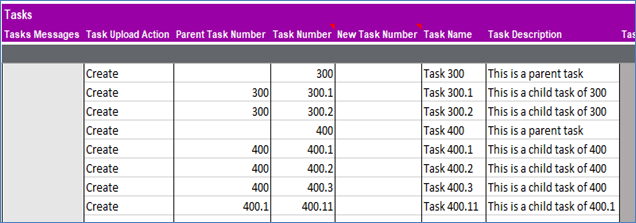
● Sequential Task Numbers: The order in which you enter the Tasks on the sheet determines its order in Oracle. It is important that the parent tasks are created first before the child tasks, therefore, they should be entered in accordance with their correct hierarchy level on the sheet. You MUST complete all the Tasks in a branch before starting on a new branch. See below for an example:
Sections: