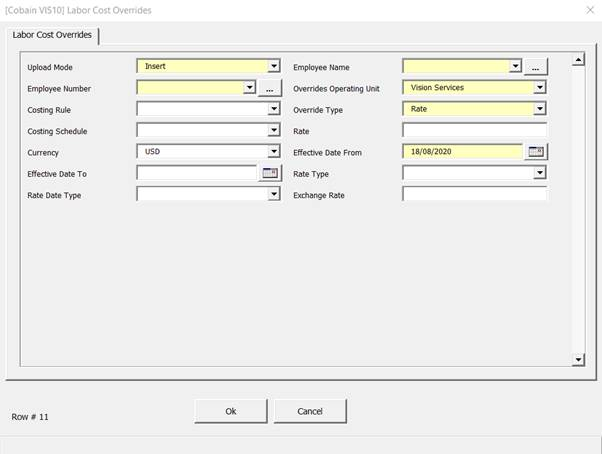
Labor Cost Overrides Form
Fields marked with a yellow background are mandatory fields. For each record uploading through the loader, mandatory fields are required to fill in the values.
Greyed-out fields are read only. Those fields contain supplementary details for the user information purpose. These values do not upload during the uploading process.
Upload Mode - Is a designated control to determine if a record is being updated, created or deleted. When a record has been downloaded this field will be automatically populated with ‘Update’. If the form has been opened on a blank row the field will default to ‘Insert’.
‘DELETE’ can be used if it is desired that a Labor Cost Rate be deleted.
Employee Name/Number – Both of these fields are required, however primarily the Employee Name will drive the population of the Employee Number. Because of this the Employee Number field can be left as the loader will determine this.
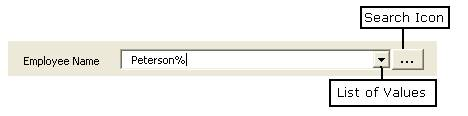
After entering part of a value plus the wild card (%) select the search button next to the appropriate field. The first record in the list of values will be populated on the form. Click the down arrow and select from the list of values provided.
Overrides Operating Unit – This field is mandatory by default and will default based on the login details.
Costing Rule – Being an optional field this does not required population. This list of values is a static list and only provides the options ‘Compensation’, ‘Exempt’ and ‘Hourly’.
Override Type, Costing Schedule & Currency – These fields have static list of values. By default the form opens with the value ‘Rate’ populated in the ‘Override Type’ field. However changing this field will have an effect on the Costing Schedule and Currency fields.
If the Override Type is set to ‘Rate’ the Costing Schedule list of values will remain an optional field with its own set of values. The Currency field remains required.
When the Override Type is set to ‘Schedule’, the Costing Schedule field then becomes a mandatory field with its own set of values. The Currency field then is no longer required when the ‘Schedule’ Override Type is chosen.
|
Override Type Value
|
Costing Schedule
|
Currency
|
|
Rate
|
Not required
|
Required
|
|
Schedule
|
Required
|
Not Required
|
Currency - You can define a labor rate to the smallest currency denomination. For example, you can define a US dollar rate to the penny.
Rate - Text based field and only accepts positive numbers.
Effective Date From - The Effective Date is a mandatory field and has the following business logic:
o If there is an existing Labor Rate for the same employee, then the date must be after the existing date.
o If an Effective date is created against an employee with a current open labor cost rate period, the existing rate will be end dated and another will be opened with the new Effective Date From.
o The date must be in the correct format ie DD/MM/YYYY or MM/DD/YYYY depending on the localization.
Effective Date To – This field is not a required field. This will end date an existing Labor Cost Rate and abide by the following rules:
o The date must be in the correct format i.e. DD/MM/YYYY or MM/DD/YYYY depending on the localization.
o The date entered must be after the existing Effective Date From.
Rate Type & Rate Date Type – These both are static list of values and are not required to be populated.